

| Newsletter |
Spring Boot – RESTful Web Service with POST Request in JSON Example
Spring-Boot-Tutorials » on May 24, 2018 { 11 Comments } By Sivateja
In the previous articles I didn’t get a chance to use the POST request in the examples, but this is very important. In this article I am going to show you how to create a Spring Boot REST service with POST request in JSON format with a simple example.
As Spring Boot by default supports JSON request and responses, we no need to add any dependencies. A simple annotation called @RequestBody will do the trick for us 😉
pom.xml
<project
    xmlns="http://maven.apache.org/POM/4.0.0"
    xmlns:xsi="http://www.w3.org/2001/XMLSchema-instance" xsi:schemaLocation="http://maven.apache.org/POM/4.0.0 http://maven.apache.org/xsd/maven-4.0.0.xsd">
    <modelVersion>4.0.0</modelVersion>
    <groupId>com.java4s</groupId>
    <artifactId>SpringBootRestfulPostJSON</artifactId>
    <version>0.0.1-SNAPSHOT</version>
    <parent>
        <groupId>org.springframework.boot</groupId>
        <artifactId>spring-boot-starter-parent</artifactId>
        <version>1.5.6.RELEASE</version>
    </parent>
    <dependencies>
        <dependency>
            <groupId>org.springframework.boot</groupId>
            <artifactId>spring-boot-starter-web</artifactId>
        </dependency>
    </dependencies>
    <properties>
        <java.version>1.8</java.version>
    </properties>
</project>
SpringBootApp.java
package com.java4s.app;

import org.springframework.boot.SpringApplication;
import org.springframework.boot.autoconfigure.SpringBootApplication;

@SpringBootApplication
public class SpringBootApp {
    public static void main(String[] args) {

        SpringApplication.run(SpringBootApp.class, args);

    }
}
Customer.java
package com.java4s.model;

public class Customer {

    private int custNo;
    private String name;
    private String country;

    public Customer() {

    }

    public Customer(int custNumber, String name, String country) {
        this.custNo = custNumber;
        this.name = name;
        this.country = country;
    }

    public int getCustNo() {
        return custNo;
    }

    public void setCustNo(int custNo) {
        this.custNo = custNo;
    }

    public String getName() {
        return name;
    }

    public void setName(String name) {
        this.name = name;
    }

    public String getCountry() {
        return country;
    }

    public void setCountry(String country) {
        this.country = country;
    }
}
SpringJava4sController.java
package com.java4s.app.controller;

import org.springframework.web.bind.annotation.PostMapping;
import org.springframework.web.bind.annotation.RequestBody;
import org.springframework.web.bind.annotation.RestController;

import com.java4s.model.Customer;

@RestController
public class SpringJava4sController {

    @PostMapping(path = "/save-cust-info")
    public String customerInformation(@RequestBody Customer cust) {

        /* You can write your DAO logic here.
         * For time being I am printing the customer data just to show the POST call is working.
         */

        return "Customer information saved successfully ::." + cust.getCustNo() + " " + cust.getName() + " " + cust.getCountry();
    }
}
application.properties
server.contextPath=/spring-boot-restful-post-json
Output
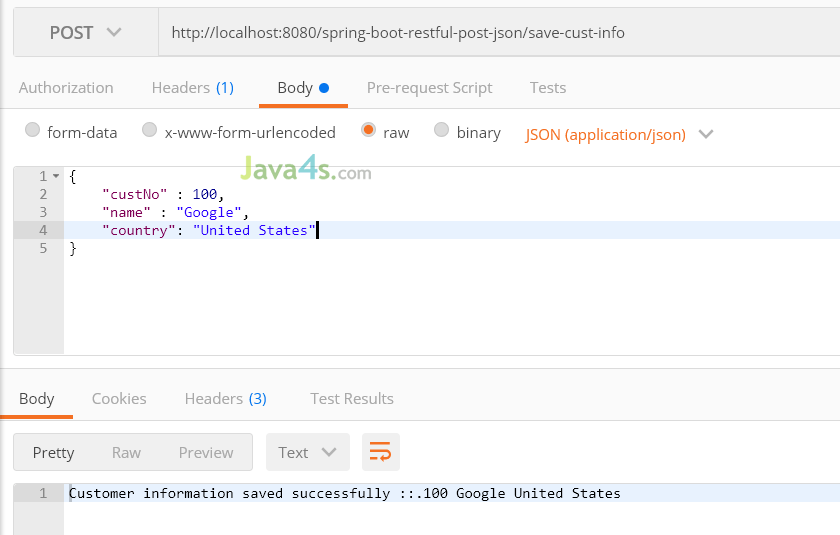
Run the application and open the URL in Postman
http://localhost:8080/spring-boot-restful-post-json/save-cust-info
Request:
{
	"custNo" : 100,
	"name" : "Google",
	"country": "United States"
}Response:

You Might Also Like
::. About the Author .:: | ||
 | ||
Comments
11 Responses to “Spring Boot – RESTful Web Service with POST Request in JSON Example”
very nice
Its nice….
Customer information saved successfully ::.0 Google United States
it shows like that ,always shows zero.why?
good eg for beginners thanks put more examples…
Its showing error in console "Error: Could not find or load main class com.example.webservice.SpringWebserviceApplication" while i running (run as–>Spring boot app)
Well in my case in application.properties,
server.servlet.contextPath=/spring-boot-restful-post-json
worked instead of
server.contextPath=/spring-boot-restful-post-json
I have got
Whitelabel Error Page
This application has no explicit mapping for /error, so you are seeing this as a fallback.
Thu May 16 17:23:40 IST 2019
There was an unexpected error (type=Method Not Allowed, status=405).
Request method 'GET' not supported
1. Where we have to create application.properties?
2. How to configure it into application?
{
"timestamp": "2020-04-11T19:22:04.467+0000",
"status": 415,
"error": "Unsupported Media Type",
"message": "Content type 'text/plain;charset=UTF-8' not supported",
"path": "/song"
}
how to solve this?
@Nilam, f you using Postman for testing, try to add this part to the Headers: Content-Type: application/json
How to post nested json objects and return values from them